
Back to Basics: A Review of Attributes
Unpublished
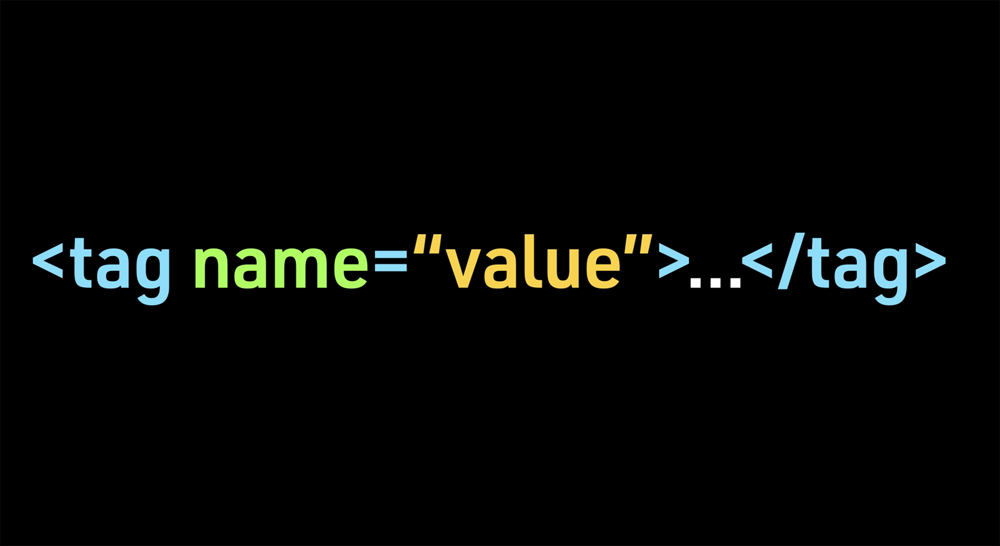
Attributes provide additional information about the contents of an element. Attributes consist of a name and value, separated by an equals sign. Attributes are added to the opening tag.
In general, the name should be written in lowercase, and the value should be in quotes.
In this example, the language attribute is applied to the paragraph element to let the browser know that the language is in spanish. The name "lang" refers to language and the value of "es" refers to spanish (for español) and is in quotes.
An attribute name describes the kind of information being applied to an element.
For example, the name “lang” is for language and generally sets the language for all the text on the webpage.
But if part of the text is in a different language, you can add a language attribute with a different value to just the element that surrounds that particular content.
The values are predefined and follow a stipulated format.
For example, in each of the following the name and the value are located in the opening tag with an equals sign separating them. The value is in quotes.
< p lang=“en-us” >< / p >
“en-us” for US English
< p lang=“fr” >< / p>
“fr” for French
< p lang=“es” >< / p >
“es” for Spanish or Espanol
< p lang=“de” >< / p >
“de” for Deutsche or German
< p lang=“zh” >< / p >
“zh” for Chinese
< p lang=“ar” >< / p >
“ar” for Arabic